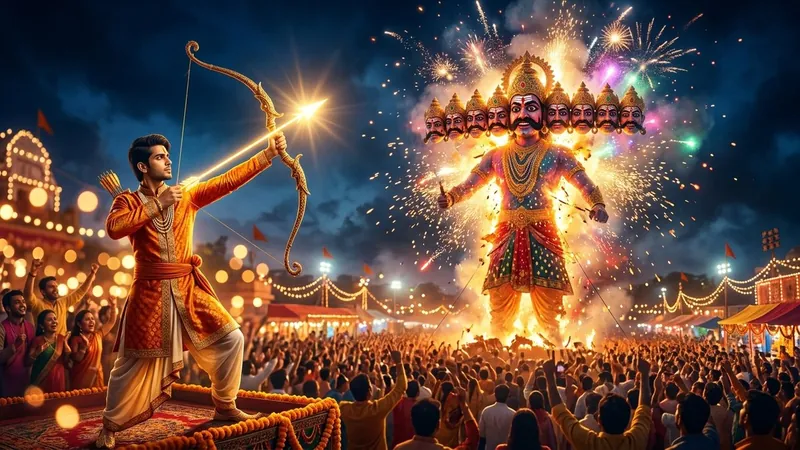
Searching for the perfect ravan dahan gemini prompt to create viral Vijayadashami photos? Dussehra celebrations reach their dramatic climax on the tenth evening with Ravan Dahan, when colossal effigies of Ravana, Kumbhakaran, and Meghnad are set ablaze with spectacular fireworks, marking the eternal triumph of good over evil. With modern AI photo editing tools like Google Gemini and Bing Image Creator, anyone can now turn their regular selfie into a cinematic festive masterpiece featuring glowing golden arrows, traditional saffron kurtas, and exploding night sky fireworks.
On this page, you will find 12+ trending Ravan Dahan AI prompts for boys, girls, couples, and siblings. Each prompt is precision-engineered with face-preservation commands, realistic lighting tokens, and camera settings so you get an ultra-photorealistic result on your very first try. Explore the curated styles below, copy your favorite prompt with a single tap, and launch Google Gemini directly to edit your photos.
12+ Trending Ravan Dahan Prompts for Gemini & AI Photo Editing
Browse through our three curated festival collections below. Click Copy Prompt to instantly copy the prompt text, or click Open Gemini to launch Google Gemini directly with your prompt ready to edit:
1. Epic Warrior Lord Ram & Hero Archer Prompts
Cinematic warrior prince poses featuring traditional saffron dhotis, ornate Dhanush bows, glowing arrows of divine light, and towering burning Ravana effigies.


2. Festive Couples, Siblings & Family Moments
Warm, emotional festival moments capturing couples, brothers and sisters, and festive girls celebrating Vijayadashami amidst sparkling crackers and carnival lights.


3. Modern Street, Bike & Grand Effigy Spectacles
Trendy viral poses including Royal Enfield motorcycle vibes, rooftop terrace festival views, Royal Blue Chikankari kurtas, and the grand three-effigy spectacle.


Step-by-Step: How to Use Ravan Dahan Prompts in Google Gemini
Using these prompts with your own face in Google Gemini is straightforward. Follow this quick 4-step workflow to get the most realistic photo editing outcome:
- Open Google Gemini: Visit gemini.google.com on your phone browser or desktop, or open the official Gemini mobile app.
- Upload a Clear Reference Photo: Click the + (Plus) icon in the chat bar and upload a high-resolution, front-facing portrait or selfie with even, natural lighting. Avoid heavy sunglasses, hats, or extreme filters.
- Copy & Paste the Prompt: Pick any style from the collection above, click the Copy Prompt button, and paste it into the prompt box. You can customize details such as clothing colors or background crowds to match your preference.
- Generate & Save: Tap submit. Gemini will analyze your facial landmarks, eye shape, and skin texture, placing you directly into the festive Dussehra scene. Download the high-resolution image to share on Instagram Reels, WhatsApp status, or festival greeting cards.
Expert Tips for 100% Face Match & Cinematic Realism
To ensure your generated AI photos look completely authentic and lifelike rather than cartoonish or artificial, keep these three essential prompt engineering rules in mind:
- Preserve Natural Skin Texture: Every prompt in our collection explicitly mentions "natural skin texture with visible pores and zero plastic airbrushing". This prevents AI tools from giving you an overly smooth, artificial mannequin appearance.
- Balance the Fire & Ambient Lighting: Ravan Dahan scenes take place at night. Specifying warm golden fire light reflections, rim lighting on the hair, and soft bokeh from carnival streetlamps ensures your subject blends naturally with the glowing effigy in the background.
- Specify Aspect Ratio: For Instagram Stories and WhatsApp statuses, always add "vertical 3:4 portrait or 9:16 aspect ratio". For wide computer wallpapers or Facebook covers, request "cinematic 16:9 widescreen".
Related Dussehra & Festival AI Prompts
Looking for more festive AI editing inspiration? Check out our other popular festival prompt guides:
Frequently Asked Questions (FAQs)
Can Google Gemini accurately edit my photo with a burning Ravan background?
Yes. By uploading your clear front-facing reference photo to Google Gemini along with our detailed prompts, the AI blends your original facial identity, jawline, and natural skin tone with the dynamic night festival background and burning effigy.
Are these Ravan Dahan prompts free to copy and use?
Yes, all prompts on The Prompt Adda are 100% free to copy, modify, and use without any subscriptions or registrations.
Can I use these prompts in ChatGPT Plus or Bing Image Creator?
Yes. These prompts are universally compatible with Google Gemini, ChatGPT (DALL-E 3), Bing Image Creator, Grok, and Midjourney. Simply click Copy Prompt and paste it into your favorite tool.
How do I make the burning Ravana effigy look more realistic?
To maximize realism, keep keywords such as "exploding fireworks sparks", "golden embers drifting in night sky", "realistic crowd bokeh", and "85mm f/1.4 lens lighting" in your prompt. This prevents flat backgrounds and creates deep cinematic contrast.